What you can do
You can take a structure out of PKR Core in the format your own tool reads. Generate once, keep the structureId, and ask for whichever file you need.
- POST /api/v1/export-volume with format raw gives a headerless 8-bit volume, one byte per voxel, x-fastest.
- The same route with format vtk gives an ASCII STRUCTURED_POINTS file that ParaView opens directly.
- POST /api/v1/export-mesh with format abaqus or fluent gives a hexahedral FEM volume mesh plus mesh statistics.
- The same route with format stl or obj gives an ASCII surface mesh of the solid.
- POST /api/v1/export-image-stack gives a ZIP of PNG slices, one per plane.
- POST /api/v1/export-slicegan gives a training dataset: the slices, volume.npy and manifest.jsonl in one ZIP.
Every one of these takes a structureId, so the file you export is the structure you measured. No regeneration, no second seed, no chance of drift between the number and the file.
Why it matters
PKR Core does not have to be the last stop. You probably already have a solver, a mesher, or a training pipeline that you trust and are not going to replace.
The useful question is whether the structure survives the trip. A handoff that quietly changes the geometry is worse than no handoff, because the FEM result still looks reasonable and no longer belongs to the structure you measured.
So this is a check you can run yourself. Export, count what arrived, and compare it against what the generator reported.
The structure being handed over
Everything below uses one sphere packing, exported repeatedly. It is the particle-packing example at 45 % target loading with 15 % overlap, on a fixed seed.
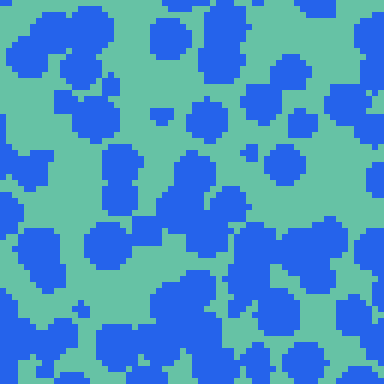
- The 64³ box holds 262,144 voxels, 118,159 of them solid, a loading of 45.07 %.
- A 32³ box on the same recipe and seed holds 14,760 solid voxels of 32,768, a loading of 45.04 %.
- The smaller box exists only because the surface exports do not fit at 64³, which is covered below.
The volume formats arrive exact
Every volume export matched the generator to the voxel. These are the checks, each done by counting the returned bytes rather than by trusting the response.
| Export | What was checked | Result |
|---|---|---|
| raw volume | Byte count against nx·ny·nz | 262,144 bytes for 262,144 voxels |
| raw volume | Non-zero bytes against the reported solid count | 118,159 against 118,159 |
| VTK | Header dimensions and cell count | DIMENSIONS 65 65 65, CELL_DATA 262144 |
| Abaqus mesh | Element count against the solid voxel count | 118,159 elements, 179,022 nodes |
| Abaqus mesh, 32³ | Same check at a second size | 14,760 elements, 23,181 nodes |
| PNG slice stack | Slices and pixel size | 64 PNGs, slice_0000 to slice_0063, 64×64 px |
| SliceGAN dataset | ZIP contents | 64 slices plus volume.npy and manifest.jsonl |
The FEM mesh is the one worth dwelling on. It carries exactly one hexahedral element per solid voxel, at both grid sizes, with no decimation and no smoothing.
That means element counts are predictable before you ask. A 45 % packing at 64³ will hand your solver roughly 118,000 elements, and the response says so in meshStatistics before you commit to importing it.
The surface mesh is exact on the way out
The STL is not an approximation of the geometry either. It writes the complete voxel surface, and the facet count proves it.
- The 32³ STL contained 31,700 facets.
- Counting the exposed voxel faces in the original volume gave 15,850: 12,855 solid-to-pore faces inside the box, plus 2,995 on the box walls.
- Two triangles per square face is 31,700, which is what came back.
So nothing was dropped in the export. Whatever happens next is not the writer losing detail.
But a surface is not a volume
Voxelize that STL again and the particles come back as shells. The loading looks almost unchanged, which is what makes this worth knowing about.
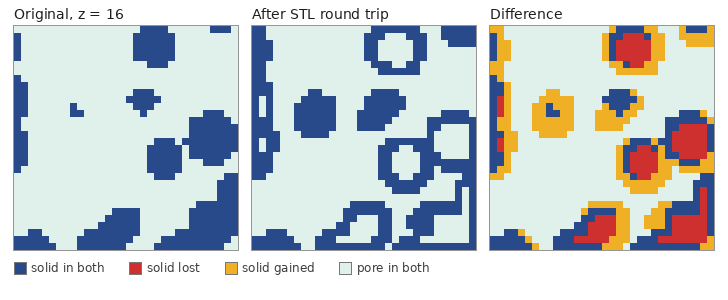
| Quantity, 32³ | Original | After the round trip |
|---|---|---|
| Solid voxels | 14,760 | 14,225 |
| Loading | 45.04 % | 43.41 % |
| Solid voxels with all six neighbours solid | 6,545 | 1,125 |
| Share of solid that is fully surrounded | 44.3 % | 7.9 % |
The totals nearly cancel, and that is the trap. 6,960 solid voxels disappeared and 6,425 new ones appeared, leaving the loading only 1.6 points lighter.
Overlap tells the real story. Only 7,800 voxels are solid in both structures, against a union of 21,185, so the two agree on about 37 % of their solid.
What returns is the surface, one voxel thick. 91 % of the re-imported solid lies within one voxel of the original surface, and the fully-surrounded share collapsing from 44 % to 8 % says the same thing from the inside.
This is not an STL quirk. Exporting the same structure as OBJ and importing that instead gave an identical result, to the voxel: 14,225 solid, 6,960 lost, 6,425 gained.
Surfaces also get expensive fast
The same 64³ structure costs wildly different amounts depending on how you ask for it. The cheapest and the dearest are three orders of magnitude apart.
| Export | Payload | Time |
|---|---|---|
| PNG slice stack (ZIP) | 48.9 KiB | 0.5 s |
| raw volume | 256 KiB | 0.4 s |
| SliceGAN dataset (ZIP) | 295.8 KiB | 0.7 s |
| VTK | 512.2 KiB | 0.6 s |
| OBJ surface | 9.5 MiB | 2.8 s |
| Abaqus mesh | 12.3 MiB | 6.1 s |
| Fluent mesh | 14.9 MiB | 7.0 s |
| STL surface | refused, estimated 56.4 MiB | 0.7 s |
The STL did not come back at all at this size. The route estimates the artifact from the boundary face count and refuses before generating anything.
POST /api/v1/export-mesh   { "structureId": "...", "format": "stl" }
400 invalid_request
"estimated mesh artifact of 59130880 bytes exceeds the inline limit of 33554432 bytes."
A dense packing is close to the worst case for a surface format. Its interface area grows with the number of particles, while the raw volume stays at one byte per voxel whatever the structure looks like.
Running it on your own structure
Generate with storeStructure set, then point each export at the returned id. The whole check is three calls and a byte count.
POST /api/v1/generate
{ "recipe": { ... }, "storeStructure": true }
-> structureId, structureSummary.statistics.occupancyRatio

POST /api/v1/export-volume
{ "structureId": "<id>", "format": "raw" }
-> contentEncoding: "base64", byteLength, content
   decode, count non-zero bytes, compare with occupancyRatio x nx x ny x nz

POST /api/v1/export-mesh
{ "structureId": "<id>", "format": "abaqus" }
-> mesh, meshStatistics.elementCount, meshStatistics.nodeCount- Check contentEncoding before decoding. raw comes back base64, VTK comes back as utf-8 text.
- Voxels are x-fastest, so index = x + nx·y + nx·ny·z. Read them in any other order and the counts still match while the geometry does not.
- format mhd is described in the API documentation but production rejected it with "format must be 'vtk' or 'raw'", so plan on vtk or raw today.
- Ask for the mesh statistics first if size is a worry. elementCount and estimatedAbaqusBytes tell you what is coming before you import it.
- Re-import a surface mesh only if you have checked what it does to your structure. The round trip above is a few calls and will tell you.
What this does not settle
This is one recipe at one loading, on two box sizes. A structure with fewer, larger features has far less surface per unit volume, and the round trip would lose proportionally less of it.
The import was also run at the original voxel size. A finer voxel size on the way back in would resolve the shell better, though it cannot invent the interior that the surface never recorded.
Nothing here was sent to an actual FEM solver. The element counts match the voxels, but whether your solver likes a 118,000-element hexahedral mesh is a separate question, and the export response does warn about import time.