What you can do
Send a recipe and a list of the results you want. One request does all of this:
- builds the structure
- measures it
- runs six property analyses on it
- extracts the pore network and the structural graph
- computes chord lengths
- packages the whole thing for download
Every result comes back together in one response. A screening loop is then one call per candidate, not a dozen calls and the bookkeeping between them.
That matters when the question is "which of these twenty candidates is worth building" rather than "what does this structure do". The per-candidate cost is what decides whether you screen twenty or argue about three.
What one call returns
The request is the recipe, the outputs you want, and one settings object per analysis you asked for. Anything you leave out is simply not run.
POST /api/v1/workflows/run
{
  "workflow": {
    "recipe": { "generatorType": "particlePacking", "grid": { "nx": 48, "ny": 48, "nz": 48 }, ... },
    "requestedOutputs": [
      "structureSummary", "metrics", "conductivity", "permeability", "diffusion",
      "elasticity", "invasionPercolation", "co2Adsorption",
      "poreNetwork", "structuralGraph", "chordLength", "package"
    ],
    "conductivityRequest": { "analysisType": "effectiveConductivity",
                             "params": { "direction": "z", "method": "graph-network" }, ... },
    "permeabilityRequest": { "analysisType": "permeability",
                             "params": { "method": "pore-network" }, ... }
  }
}
Run against a 48³ particle packing at 45 % solid, that call came back in 5.4 seconds with eleven of the twelve requested results. Assembling the same twelve results one endpoint at a time took twelve round trips and 6.0 seconds.
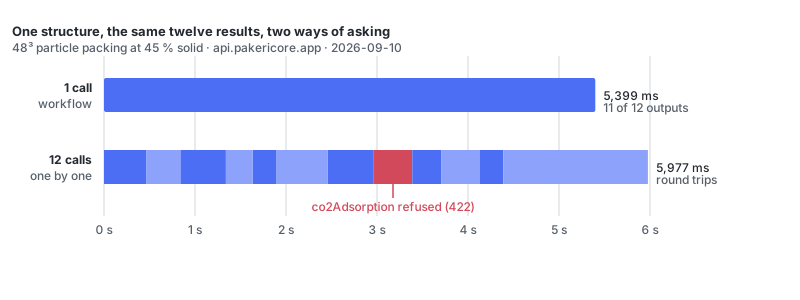
The clock is not the point here. The work is the same work, and the server does it in the same order either way. What changes is how much code you write. The second row means holding a structure handle, calling twelve endpoints in the right order, and deciding what to do when one of them says no.
When one analysis refuses
In that run, CO₂ adsorption did not produce a number. The time step in the request was too coarse to stay stable on this structure, so the solver stopped rather than returning a value it did not believe.
This is the normal case, not an unusual one. A set of candidates will contain structures where a percolating path does not exist, and structures where solver settings that suited the last one do not suit this one.
The workflow call still returned 200. The other eleven results were in place, and the failure was named in a separate list:
"stepErrors": [
  {
    "step": "co2Adsorption",
    "message": "co2_adsorption: unstable_timestep",
    "code": "co2_adsorption_unstable_timestep"
  }
]
Called directly, the same request answers 422 with the same code. The endpoint is clear that this is an input problem and not a server fault.
The difference shows up inside a loop. A sequence of twelve calls has to catch the 422, hold on to the eleven results it has already collected, and decide whether to abandon this candidate or carry on with a hole in it. The workflow call has already made that decision. Everything that worked comes back, and the part that did not is labelled by step and by code. A screen over twenty candidates finishes, then tells you which cells are empty and why.
Six candidates, six calls
Six structures built from the same recipe, each asked for a structure summary, metrics, effective conductivity and permeability. Six calls, run one after another, finished in 4.8 seconds altogether. That is a little over half a second per candidate once the first request had warmed up.
| Candidate | Call time | Solid fraction | Effective conductivity (W/m·K) |
|---|---|---|---|
| 1 | 1,555 ms | 0.4511 | 4.26 |
| 2 | 659 ms | 0.4502 | 4.20 |
| 3 | 686 ms | 0.4515 | 4.36 |
| 4 | 623 ms | 0.4501 | 4.44 |
| 5 | 593 ms | 0.4515 | 4.49 |
| 6 | 635 ms | 0.4511 | 4.70 |
The loop that produced this is the request above, with the recipe swapped each time and the results pushed onto an array. There is no polling, no job id, and no partial state to clean up if one candidate goes wrong. Each call is self-contained, so a failed one costs you that candidate and nothing else.
Sub-second per candidate is what makes this worth scripting at all, and it comes from the methods the analyses were asked to use. Both of these ran on reduced network models rather than full-grid solves. That choice is yours to make per request, and it is the difference between a screen you run while you are looking at it and one you leave overnight.
When to use it, and when not
Use one call per candidate when you want the same set of results for many structures, and you care more about finishing the sweep than about any single number in it:
- design-of-experiments runs
- screening a formulation space
- an agent that has to get a complete picture of a structure before it decides what to do next
Reach for the individual endpoints instead when you are working on one structure and iterating: changing solver parameters, inspecting an intermediate result before deciding the next step, or re-running a single analysis without rebuilding anything. A workflow call always starts from the recipe, so it rebuilds the structure every time. When the structure is fixed and you are varying the question, register it once and call analyses against the handle.